To use the Bitrix24 customer import feature, you must configure an incoming webhook. Follow these steps:
1. Sign in to your Bitrix24 account.
2. From the main menu or search, open **Developer resources**.
3. Select **Other**, then **Incoming webhook**.
4. In the webhook settings, grant the **CRM** permission.
5. Confirm the configuration and copy the generated webhook URL.
6. Return to Methos Cloud ERP. Open **Issuer registration**, select the **API** tab, enable the Bitrix24 API option, and paste the webhook URL into the integration URL field.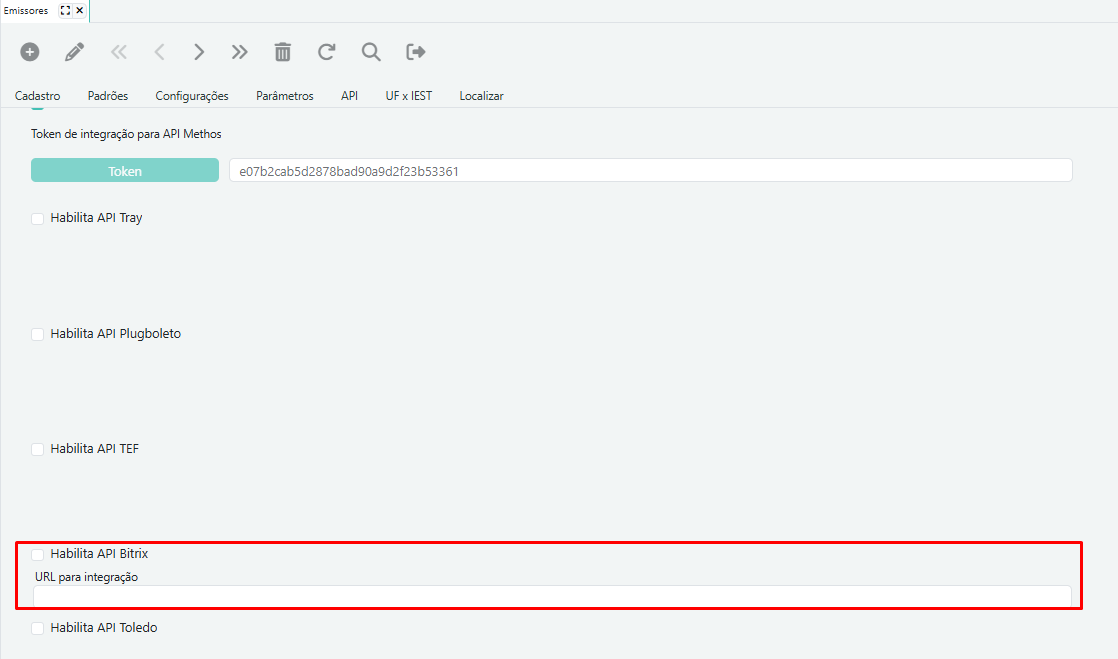
*Figure 1. API tab in the Issuers screen, showing the Bitrix24 API option and the integration URL field.*
After completing these steps, contact Methos technical support to request access to the customer search screen.
Keep the webhook URL private. Anyone with access to it may be able to use its CRM permissions.